> ## Documentation Index
> Fetch the complete documentation index at: https://docs.speedsignal.com/llms.txt
> Use this file to discover all available pages before exploring further.
# Top Movers
> A price-driven view of Speed Signal AI: the day's biggest gainers, losers, and volume leaders, ordered by how much they moved rather than by Conviction.
**Top Movers** is a different lens on the same session. The rest of the dashboard organizes stocks by setup phase and Conviction; Top Movers ignores that and sorts purely by **how much each name moved today**. Use it to see where the day's largest price and volume changes landed.
Speed Signal AI is screening and analytics software, not a broker-dealer or investment adviser. Scores, phases, and screening results are data outputs and research candidates, not investment advice, recommendations, trading signals, or a buy list. Always do your own research.
## What you see
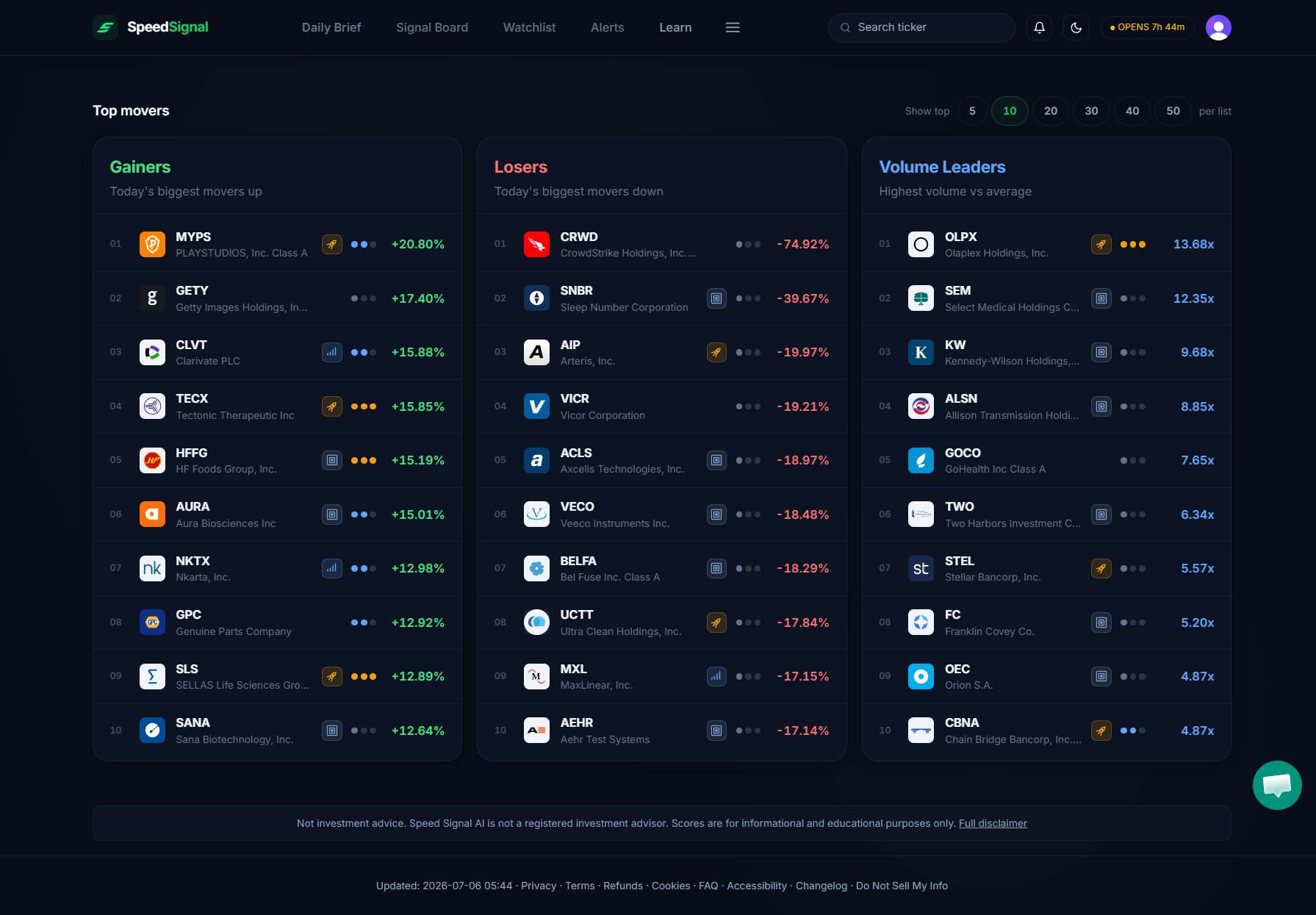 Top Movers shows three lists for the most recent completed session:
* **Gainers**: the biggest price moves up.
* **Losers**: the biggest price moves down.
* **Volume Leaders**: names trading at the highest volume versus their own average.
A **Show top** selector lets you set how many names appear in each list, and each row still carries its **Phase** badge so you can see how a big mover is classified by the rest of the system.
## Why this lens is useful
Because Top Movers is sorted by price change instead of Conviction, it surfaces names the phase-based views may rank lower. A large gainer that is far above its base might show as **Extended** with modest Conviction on the Signal Board, yet still lead this list. Reading the two together tells you both *what moved most* and *where that move sits* in the setup life cycle.
This view is ordered by price and volume change, not by score. A name near the top of Gainers is not "higher-ranked" by Speed Signal AI; it simply moved the most. For the scoring-based ranking, use the [Signal Board](/dashboard/signal-board).
## Limits & common mistakes
* **Movers reflect the last completed session**, not live prices. The list is a snapshot of the close.
* **A big move is not a phase or a Conviction level.** Top Movers measures magnitude only; the Phase badge on each row comes from the separate scoring system.
* **Large moves cut both ways.** An outsized gain often means a name is extended, which is context to weigh, not a cue to act on.
## Next steps
Rank and filter the same names by phase and Conviction instead.
See what changed today across the whole scan.
Unusual volume, gaps, and other flags worth a closer look.
Top Movers shows three lists for the most recent completed session:
* **Gainers**: the biggest price moves up.
* **Losers**: the biggest price moves down.
* **Volume Leaders**: names trading at the highest volume versus their own average.
A **Show top** selector lets you set how many names appear in each list, and each row still carries its **Phase** badge so you can see how a big mover is classified by the rest of the system.
## Why this lens is useful
Because Top Movers is sorted by price change instead of Conviction, it surfaces names the phase-based views may rank lower. A large gainer that is far above its base might show as **Extended** with modest Conviction on the Signal Board, yet still lead this list. Reading the two together tells you both *what moved most* and *where that move sits* in the setup life cycle.
This view is ordered by price and volume change, not by score. A name near the top of Gainers is not "higher-ranked" by Speed Signal AI; it simply moved the most. For the scoring-based ranking, use the [Signal Board](/dashboard/signal-board).
## Limits & common mistakes
* **Movers reflect the last completed session**, not live prices. The list is a snapshot of the close.
* **A big move is not a phase or a Conviction level.** Top Movers measures magnitude only; the Phase badge on each row comes from the separate scoring system.
* **Large moves cut both ways.** An outsized gain often means a name is extended, which is context to weigh, not a cue to act on.
## Next steps
Rank and filter the same names by phase and Conviction instead.
See what changed today across the whole scan.
Unusual volume, gaps, and other flags worth a closer look.