> ## Documentation Index
> Fetch the complete documentation index at: https://docs.speedsignal.com/llms.txt
> Use this file to discover all available pages before exploring further.
# How scoring works
> The 0–100 number behind every ticker in Speed Signal AI, shown in the app as Conviction NN/100, and the three pillars (Base, Accumulation, and Ignition) that produce it.
Every ticker in the daily scan carries one number from 0 to 100 that summarizes how many of the model's breakout conditions are present. The app surfaces that number as **Conviction NN/100** on a ticker's detail page. It is produced by three pillars, and it is deterministic and rules-based, not an AI opinion.
Speed Signal AI is screening and analytics software, not a broker-dealer or investment adviser. Scores, phases, and screening results are data outputs and research candidates, not investment advice, recommendations, trading signals, or a buy list. Always do your own research.
## What you see
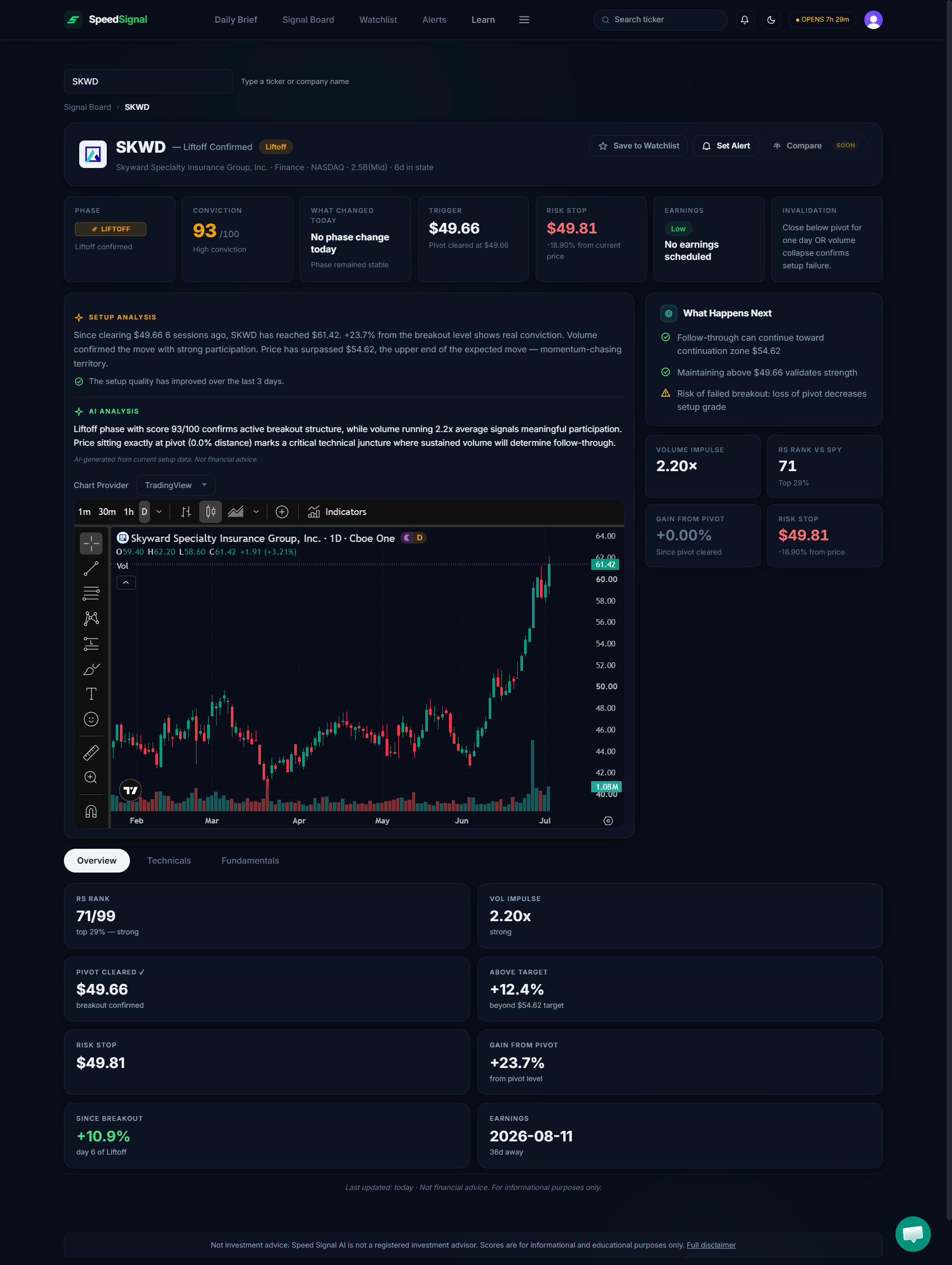 The raw 0–100 number is not labeled "score" on screen. Where you actually meet it:
* **On a ticker's detail page** it appears as **Conviction NN/100** plus a level: **Low**, **Medium**, or **High**.
* **On rows** in the Signal Board and elsewhere it shows as the level only, under the **Conviction** column (abbreviated **Conf** in the Signal Board's Advanced Filters drawer table and the Anomalies table).
* **Every row also carries a Phase badge** (Coiling, Pre-Ignition, Liftoff, or Below), which is a separate label. See [Phases & Conviction](/scores/phases-and-conviction).
So when this page talks about "the score," that is the same 0–100 number the app shows you as Conviction.
## How the number is built
The model evaluates each ticker across **three pillars**. Each pillar is scored 0–100 based on how many of its conditions are present, and the three combine into the single 0–100 number (their average).
### Pillar 1: Base "Stealth Coil"
Describes how orderly and compressed a stock's recent trading behavior is:
* **Volatility Contraction**: how much the day-to-day price swings have tightened versus the stock's own recent history.
* **Tightness**: how narrow and controlled the recent trading action is.
* **Squeeze Detection**: whether recent volatility compression is notable enough to support a tighter, more orderly setup classification.
* **Trend Quality**: whether the stock is trending up in an orderly way rather than downtrending or chopping sideways.
* **Pivot Proximity**: how close the stock is to a relevant technical reference area identified by the methodology.
### Pillar 2: Accumulation "Demand Profile"
Surfaces price and volume behavior often associated with persistent participation:
* **Relative Strength**: whether the stock is leading the broad market rather than lagging it.
* **Money Flow**: whether volume and price behavior fit sustained-participation patterns rather than a one-day spike.
* **Volume Dry-Up**: quiet volume while price holds tight, a pattern historically associated with reduced selling pressure.
* **Sector Tailwind**: whether the broader industry group is supportive rather than acting as a headwind.
### Pillar 3: Ignition "Participation Expansion"
Measures whether current price and participation behavior is broadening versus the recent baseline:
* **Volume Impulse**: whether trading activity is expanding materially versus the stock's normal baseline.
* **Early Ignition**: whether price and participation are strengthening in the current data.
* **Candle Quality**: whether the session's price action shows broad-participation characteristics rather than thin or one-sided trading.
## Find a ticker's Conviction number
From the [Signal Board](/dashboard/signal-board) or [Daily Brief](/dashboard/daily-brief), select any ticker to open its [detail page](/dashboard/ticker-detail).
The **Conviction NN/100** number and its **Low / Medium / High** level sit near the top of the page, alongside the Phase badge.
Open the **Technicals** sub-tab to review the underlying measures that feed the three pillars.
## How to read the number
* **Higher means more conditions are lining up**, not that a stock is "good" or that a move will happen. It is a summary of what the data is doing right now.
* **The number and the level answer different questions.** The 0–100 number measures how many conditions are present for that ticker. The Low/Medium/High **level** measures how that number ranks against the rest of the market that same day. A high number does not guarantee a High level, because the level depends on how everything else scored. See [Phases & Conviction](/scores/phases-and-conviction).
* **It is reproducible.** Given the same market data, the model produces the same number every time. There is no sentiment analysis or subjective judgment involved.
## Limits & common mistakes
A high number is context to research, not a measure of how good a position would be. The model does not know your goals, timeframe, or risk, and it never suggests what to do with money.
* **Do not read the number as a prediction.** It describes present conditions, not a forecast that a move will continue.
* **Do not compare numbers across different days as if they were fixed grades.** Scores update once per day and can shift with data revisions. See [Data & coverage](/scores/data-coverage).
* **A high number can still carry risk flags** (for example, Extended or Pre-Earnings Run). Those do not change the number; they add context you should read alongside it.
## Next steps
How the four phases and the Low/Medium/High levels work, and why they are separate axes.
Where the numbers come from, when they update, and which tickers are eligible.
Filter and compare tickers by phase, Conviction, and market cap.
Plain-language definitions of every label you see in the app.
The raw 0–100 number is not labeled "score" on screen. Where you actually meet it:
* **On a ticker's detail page** it appears as **Conviction NN/100** plus a level: **Low**, **Medium**, or **High**.
* **On rows** in the Signal Board and elsewhere it shows as the level only, under the **Conviction** column (abbreviated **Conf** in the Signal Board's Advanced Filters drawer table and the Anomalies table).
* **Every row also carries a Phase badge** (Coiling, Pre-Ignition, Liftoff, or Below), which is a separate label. See [Phases & Conviction](/scores/phases-and-conviction).
So when this page talks about "the score," that is the same 0–100 number the app shows you as Conviction.
## How the number is built
The model evaluates each ticker across **three pillars**. Each pillar is scored 0–100 based on how many of its conditions are present, and the three combine into the single 0–100 number (their average).
### Pillar 1: Base "Stealth Coil"
Describes how orderly and compressed a stock's recent trading behavior is:
* **Volatility Contraction**: how much the day-to-day price swings have tightened versus the stock's own recent history.
* **Tightness**: how narrow and controlled the recent trading action is.
* **Squeeze Detection**: whether recent volatility compression is notable enough to support a tighter, more orderly setup classification.
* **Trend Quality**: whether the stock is trending up in an orderly way rather than downtrending or chopping sideways.
* **Pivot Proximity**: how close the stock is to a relevant technical reference area identified by the methodology.
### Pillar 2: Accumulation "Demand Profile"
Surfaces price and volume behavior often associated with persistent participation:
* **Relative Strength**: whether the stock is leading the broad market rather than lagging it.
* **Money Flow**: whether volume and price behavior fit sustained-participation patterns rather than a one-day spike.
* **Volume Dry-Up**: quiet volume while price holds tight, a pattern historically associated with reduced selling pressure.
* **Sector Tailwind**: whether the broader industry group is supportive rather than acting as a headwind.
### Pillar 3: Ignition "Participation Expansion"
Measures whether current price and participation behavior is broadening versus the recent baseline:
* **Volume Impulse**: whether trading activity is expanding materially versus the stock's normal baseline.
* **Early Ignition**: whether price and participation are strengthening in the current data.
* **Candle Quality**: whether the session's price action shows broad-participation characteristics rather than thin or one-sided trading.
## Find a ticker's Conviction number
From the [Signal Board](/dashboard/signal-board) or [Daily Brief](/dashboard/daily-brief), select any ticker to open its [detail page](/dashboard/ticker-detail).
The **Conviction NN/100** number and its **Low / Medium / High** level sit near the top of the page, alongside the Phase badge.
Open the **Technicals** sub-tab to review the underlying measures that feed the three pillars.
## How to read the number
* **Higher means more conditions are lining up**, not that a stock is "good" or that a move will happen. It is a summary of what the data is doing right now.
* **The number and the level answer different questions.** The 0–100 number measures how many conditions are present for that ticker. The Low/Medium/High **level** measures how that number ranks against the rest of the market that same day. A high number does not guarantee a High level, because the level depends on how everything else scored. See [Phases & Conviction](/scores/phases-and-conviction).
* **It is reproducible.** Given the same market data, the model produces the same number every time. There is no sentiment analysis or subjective judgment involved.
## Limits & common mistakes
A high number is context to research, not a measure of how good a position would be. The model does not know your goals, timeframe, or risk, and it never suggests what to do with money.
* **Do not read the number as a prediction.** It describes present conditions, not a forecast that a move will continue.
* **Do not compare numbers across different days as if they were fixed grades.** Scores update once per day and can shift with data revisions. See [Data & coverage](/scores/data-coverage).
* **A high number can still carry risk flags** (for example, Extended or Pre-Earnings Run). Those do not change the number; they add context you should read alongside it.
## Next steps
How the four phases and the Low/Medium/High levels work, and why they are separate axes.
Where the numbers come from, when they update, and which tickers are eligible.
Filter and compare tickers by phase, Conviction, and market cap.
Plain-language definitions of every label you see in the app.