

What you see
Notification channels and Email briefs have separate controls. Save applies your changes.Sign in or create an account
Speed Signal AI uses a hosted sign-in provider, so you can use an email and password or a social login.1
Open the dashboard
Go to app.speedsignal.com and sign in.
2
Choose email or a social login
Enter your email to create or access your account, or continue with one of the social providers offered.
3
Verify and you're in
Confirm your email if prompted, and the dashboard opens on the Daily Brief.
Switch between dark and light themes
The theme toggle sits in the top navigation bar. Select it to move between dark and light, or press T. Your choice is saved in the browser you’re using, so it sticks between visits on that device.Choose a chart provider
On any ticker’s detail page, a Chart Provider control sits above the candlestick chart. It changes only how the chart renders, not the data behind it:- TradingView: the default; a full-featured interactive chart.
- Speed Charts: a fast, lightweight renderer.
1
Open a ticker's detail page
Select any row on the Signal Board or Daily Brief to open its detail view.
2
Pick a provider
Use the Chart Provider dropdown above the chart to switch rendering. If a provider can’t load, the dashboard falls back to another automatically.
Set your notification preferences
In Settings, Notification channels controls how alerts reach you:- Email: delivery to the address you enter, with a Test Email button to confirm it works.
- Push Notifications: browser push, with a Test Push button.
- In-App Notifications: alerts shown inside the dashboard while you’re active.
- One email a day: matching alerts arrive together, up to 10 alerts ordered by score. Any remaining alerts stay in Recent activity; they are not sent separately. There is at most one alert email per completed session and local day.
- Enabled channels deliver when alerts are ready; there is no Quiet Hours or Delivery rules section.
- Fixed delivery limits: there is no quantity or digest setting. Pro browser push is grouped with a separate limit of 10 events per day. In-app history keeps all matches.
Email briefs and The Daily Read
In Settings → Email briefs, choose Market cap, then manage Daily Brief and Weekly Brief. The filter applies to candidate lists in both emails and is available on Free and Pro; Daily Brief itself remains Pro. New preferences start with Large ($10B and above); existing selections are kept. Market-wide summaries are not filtered. Save applies your changes. Brief emails are sent automatically when ready; there is no delivery-time selector. Alerts also deliver when ready through enabled channels, within their delivery limits. Free accounts can request The Daily Read, a market-only email with no tickers. Its selector offers Weekly only, Daily, and Liftoff days only. The default is Weekly only: choosing Daily or Liftoff days and saving is your explicit opt-in. Liftoff days sends a read only when new names entered Liftoff in the completed session. The pilot includes a weekly-only comparison group, so opting in does not guarantee immediate daily delivery. The setting explains whether your request is waiting, in the weekly-only group, active or paused. Weekly Brief must remain enabled during the pilot; turning it off also stops The Daily Read. The Daily Read’s own unsubscribe link leaves Weekly unchanged. The Daily Read contains three market-level readings and asks about Pro at most twice per week. It does not replace the full Pro Daily Brief. The Weekly Brief has its own four-week editorial cycle.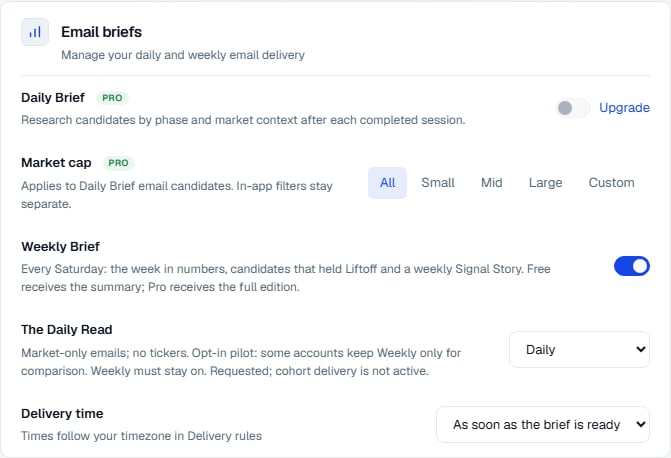
This settings example uses simulated data. A request may wait for its pilot group to open.
Delete your account and data
Also in Settings, under Privacy & data:- Delete my account permanently erases your account and all your data. You’ll be asked to type
DELETEto confirm, and you’re signed out afterward. This cannot be undone.
Plans and billing
There are two plans:
Pro comes with a 7-day free trial (full access; cancel before day 8 to avoid a charge) and a 30-day money-back guarantee on new subscriptions.
Payments are processed securely by Stripe. Speed Media Group LLC is the merchant and seller of record, so charges may appear on your statement as Speed Signal AI, Speed Media Group, or a similar descriptor. Applicable taxes may be calculated at checkout.
Limits & common mistakes
- Theme and chart provider are per-browser. They’re saved on the device you set them on, so a different browser or device may start with the defaults.
- Push needs browser permission. If push is blocked, enable notifications for the site in your browser settings, then use Test Push to confirm.
- Delivery limits apply to email and push. The in-app bell still logs every alert. Daily and Weekly Briefs are email-only; they do not create push notifications.
- Billing is managed from Plan & billing when available. Contact Support if you need help or want to request a refund.
Next steps
Alerts
Create the presets and per-ticker rules that these preferences deliver.
FAQ
Billing, trials, refunds, and the questions people ask most.
Legal & disclaimer
The full disclaimer and links to Terms, Privacy, and Refunds.