

Speed Signal AI is screening and analytics software, not a broker-dealer or investment adviser. Scores, phases, and screening results are data outputs and research candidates, not investment advice, recommendations, trading signals, or a buy list. Always do your own research.
What you see
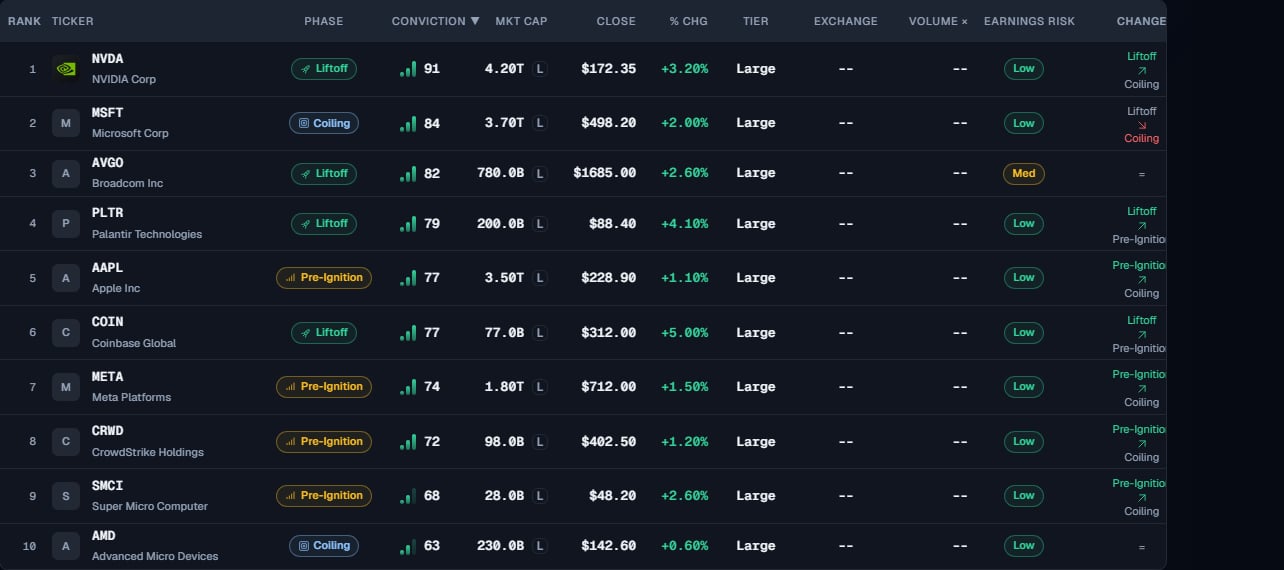
The screenshot uses simulated data to illustrate the interface.
Free and Pro. On Free, the board shows the top 20 ranked setups of the day (all columns), with a banner showing how many more exist. The KPI counts and chip counts still reflect the whole universe. Pro shows the full ranked universe (~3,000 tickers) and the Advanced Filters drawer.
Scores update once per day, after the US market closes. Everything you see reflects the most recent completed trading session, not live intraday prices. The only live element is the candlestick chart on a ticker’s detail page.
The KPI row
Four cards sit above the table and count how many names fall into each group in the current session:“High Conviction” groups the highest relative Conviction of the session, not an objectively good or recommended list. See Phases & Conviction for why Conviction resets each day.
Filter with the themed chips
Discovery chips sit above the table. Selecting a chip applies its filter; selecting it again clears it. Chips from different groups can be combined; a new chip in the same group replaces the previous selection.Advanced Filters
The “Advanced Filters” drawer is a Pro feature. The “Advanced Filters” button, at the end of the chip row, opens a drawer with the deeper controls:- Conviction pills (Low / Medium / High) to keep or hide names by Conviction level.
- Status, Tier (Large / Mid / Small), and Risk Flags pills to include or exclude names by phase, size band, or anomaly.
- A Top N cap that limits the list to the highest-ranked names.
- The eligibility thresholds, each with an inline help icon (see below).
- Clear All to reset every filter.
There is no sector filter on the Signal Board. Sector context lives on the Daily Brief as the Sector Strength card.
Adjust the eligibility thresholds
Before scoring, every stock must pass a set of coverage filters so the board stays focused on liquid, tradable US equities. In the Advanced Filters drawer you can adjust most of these thresholds yourself, and each field has an inline help icon explaining what it does:
Free float above 30% is also required, and names in a clearly established downtrend are filtered out. See Data & coverage for the default values and the universe.
Why isn’t my ticker here?
If a stock you expect is missing, it usually failed one of the filters above, most often price, liquidity, market cap, or the earnings buffer around a confirmed report date. It may also simply be in the Below phase (not in an active setup right now) rather than filtered out. Loosen the relevant threshold in the Advanced Filters drawer to check.How to read the results
- Lead with the Phase badge (where the setup sits) and Conviction, whose shaded icon shows the band and whose number shows the exact score. They are separate axes: a Coiling name can be High Conviction and a Liftoff name can be Low.
- Use the context columns in the same sortable table, such as Tier, Market Cap, Exchange, and Volume ×, alongside Score and Phase.
- Risk flags such as Extended, Elevated VIX, or Pre-Earnings Run are informational; they do not change the score. See Anomalies.
- Select the logo, ticker or company to open the complete detail directly. Select the rest of the row to open its preview panel (a side panel on desktop, a bottom sheet on mobile), then use “View Full Analysis” if needed. Star and alert buttons keep their own actions.
Limits & common mistakes
- The board reflects the last completed session. Nothing here updates intraday.
- A high Conviction is relative to today’s pool, not a rating of the company. It can change tomorrow because the market changed, not because the stock did.
- Loosening every threshold widens the list but not its meaning. The filters exist to keep the scan on liquid, tradable names.
- Chips and advanced controls share one result list. A Daily Brief drill-down clears the active chips, and selecting a chip clears the drill-down.
Next steps
How scoring works
The three pillars behind every phase and Conviction level.
Phases & Conviction
What each phase means and why Conviction is relative.
Ticker detail
Open any row for its full chart, technicals, and fundamentals.