

What you see
Before you add anything, the Watchlist shows an empty state with a short prompt to add your first ticker. Once you star a few names, it fills with a table of your tracked tickers plus a recent-activity feed.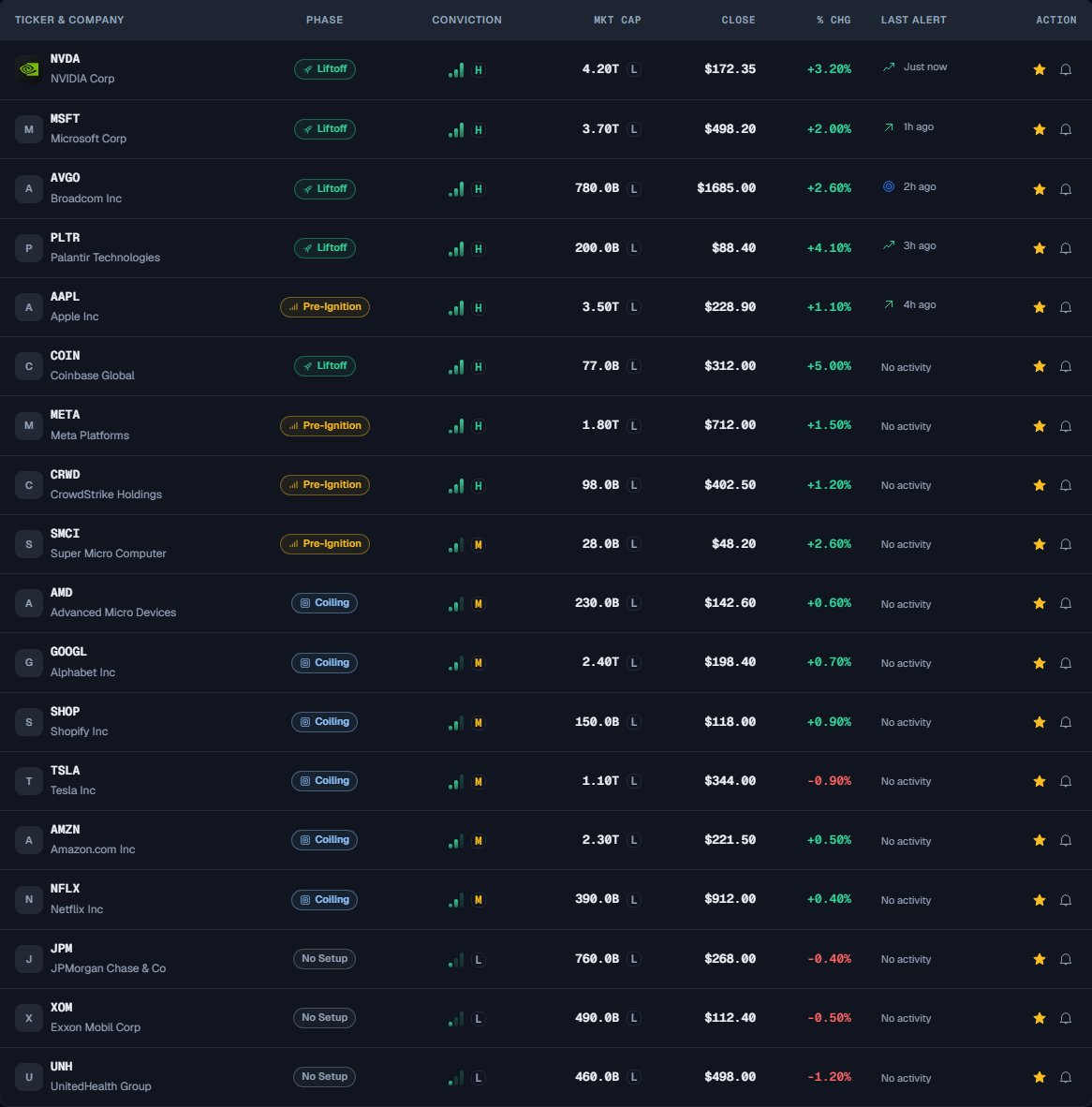
The screenshot uses simulated data to illustrate the interface.
Add a ticker to your Watchlist
You can star a ticker from almost anywhere it is listed: the Signal Board, the Daily Brief, or its own detail page.1
Find the ticker
Locate the name in a table (Signal Board or Daily Brief) or open its detail page.
2
Click the star
Click the star icon on its row. On a ticker’s detail page, use the Save to Watchlist button instead.
3
Confirm it saved
The star turns amber once the name is tracked. Open the Watchlist tab (or press 3) to see it listed.
Remove a ticker
Click the amber star again, on the ticker’s Watchlist row or anywhere it appears, to untrack it. It disappears from your Watchlist right away.How to read your Watchlist
Each row shows Ticker & Company, Phase, Conviction, Close, % Chg, Last Alert, and actions. The Conviction column uses three ascending bars with a green gradient: one shaded bar means Low, two Medium, and three High. A small H, M or L chip beside the icon uses the same compact shape as the Market Cap tier chips, with green for High, amber for Medium and gray for Low, on the letter only, with a neutral Market Cap-style outline and a transparent background; there is no progress bar underneath. Hover, focus, or tap the indicator to read the level and exact score; these are relative screening measurements, not probabilities of success. The score number is not printed in this table. Setup Quality and Added columns are not shown. Your saved tickers and their original save dates are preserved. Select a row or its logo, ticker or company to open Ticker Detail. The row works with Enter or Space, and the identity is a direct link. The only action buttons are the alert bell and the Watchlist star; a separate view icon is no longer needed. A Today on Your Watchlist card sits below the full-width table and lists activity from the last 7 days. Events appear in chronological reading order across three columns on wide screens, with fewer columns on smaller screens. Filter by the event types present in your list, such as upgrades, score jumps, or score drops. The card starts with nine events; Show more reveals nine more at a time. It answers “what changed on my list since I last looked?” without making you re-check each ticker. The table and activity use the page’s normal vertical scrolling. Each event includes its company logo and a small event indicator. A score drop uses a downward arrow, its label and a negative change, so it does not rely on color alone. The first activity load is labeled Loading, not a zero count. Returning to Watchlist or selecting Refresh keeps the last loaded activity visible while it updates, along with your activity filter and expanded list. If an update fails, the card keeps the previous activity and offers Retry. A confirmed empty list instead says that there was no activity in the last seven days.Limits and common mistakes
- Free tracks up to 10 tickers; Pro is unlimited. On Free you can save up to 10 names; adding an eleventh prompts you to upgrade. Pro removes the cap.
- It is tied to your account. Sign in to see your Watchlist; it syncs across your devices. Signed out, you only see the empty state.
- It updates once per day. Like the rest of the dashboard, the phases and scores on your Watchlist reflect the most recent completed session after the US close, not live intraday prices. (The one live element anywhere in the product is the candlestick chart on a ticker’s detail page.)
- Conviction is relative. A tracked ticker’s Conviction can change from one day to the next because the rest of the market scored differently that session, not because the company did. See Phases and Conviction.
- The Watchlist organizes, it does not advise. Adding a ticker tracks it for you; it is not a buy list or a recommendation to act.
Next steps
Signal Board
Explore and filter the full scan to find names worth starring.
Alerts
Get notified when the tickers or conditions you track change.
Phases and Conviction
Understand what the phase badge and Conviction level mean.